Workflow Templates
Ready-to-use n8n workflows built by automation experts. Download, import, and start automating.
Ready-to-use n8n workflows built by automation experts. Download, import, and start automating.
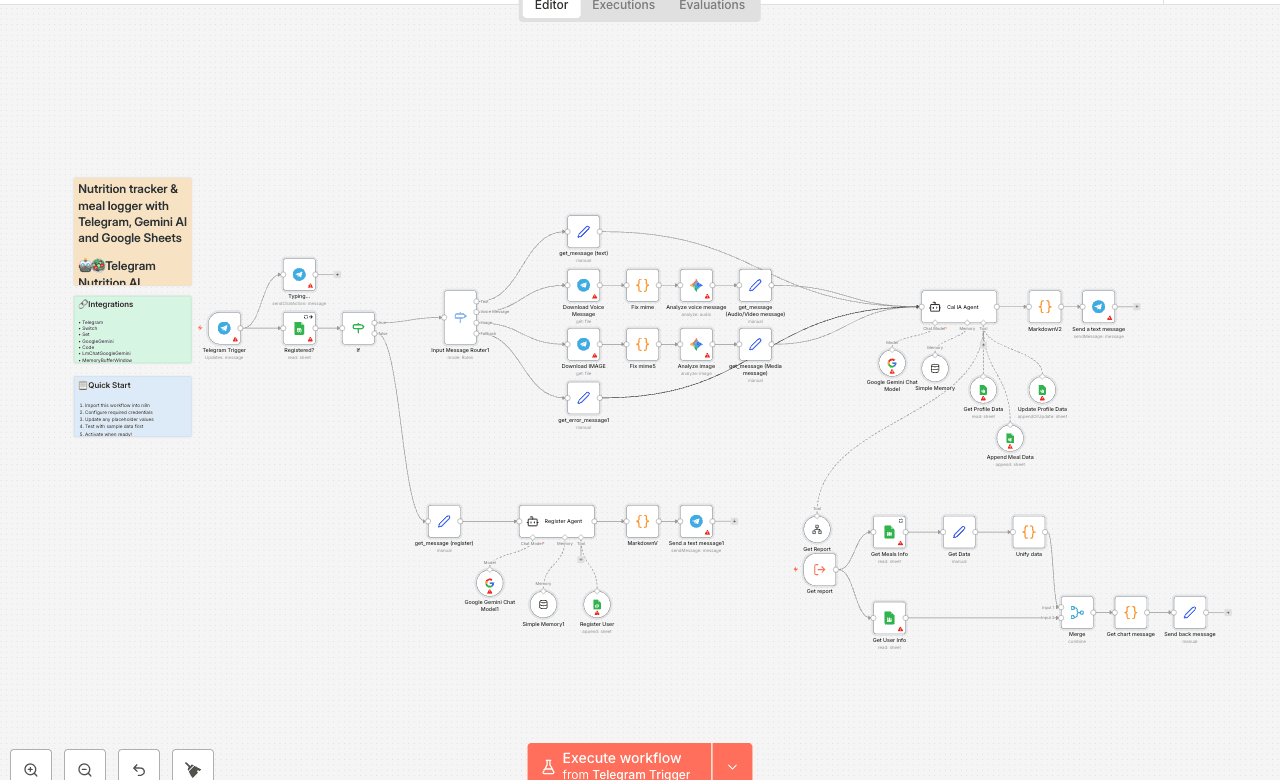
🤖🥗 Telegram Nutrition AI Assistant (Alternative to Cal AI App)
> AI-powered nutrition assistant for Telegram — log meals, set goals, and get personalized daily reports with Google Sheets integration.
📋 Description
This n8n template creates a Telegram-based Nutrition AI Assistant 🥑🔥 designed as an open-source alternative to the Cal AI mobile app. It allows users to interact with an AI agent via text, voice, or images to track meals, calculate macros, and monitor nutrition goals directly from Telegram.
The system integrates Google Sheets as the database, handling both user profiles and meal logs, while leveraging Gemini AI for natural conversation, food recognition, and daily progress reports.
✨ Key Features
💬 Multi-input support: Text, voice messages (transcribed), and food images (AI analysis). 📊 Macro calculation: Automatic estimation of calories, proteins, carbs, and fats. 📝 User-friendly registration: Simple onboarding without storing personal health data (no weight/height required). 🎯 Goal tracking: Users can set and update calorie and protein targets. 📈 Daily reports: Personalized progress messages with visual progress bars. 🗂 Google Sheets integration:
Profile table for user targets. Meals table for food logs. 🔄 Advanced n8n nodes: Includes use of Merge, Subworkflow, and Code nodes for data processing and report generation.
💡 Acknowledgment
Inspired by the Cal AI concept 💡 — this template demonstrates how to reproduce its main functionality with n8n, Telegram, and AI agents as a flexible, open-source automation workflow.
🏷 Tags
telegram ai-assistant nutrition meal-tracking google-sheets food-logging voice-transcription image-analysis daily-reports n8n-template merge-node subworkflow-node code-node telegram-trigger google-gemini
💼 Use Case
Use this template if you want to:
🥗 Log meals using text, images, or voice messages. 📊 Track nutrition goals (calories, proteins) with daily progress updates. 🤖 Provide a chat-based nutrition assistant without building a full app. 🗂 Store structured nutrition data in Google Sheets for easy access and analysis.
💬 Example User Interactions
📸 User sends a photo of a meal → AI analyzes the food and logs calories/macros. 🎤 User sends a voice message → AI transcribes and logs the meal. ⌨️ User types “report” → AI returns a daily nutrition summary with progress bars. 🥅 User says “update my protein goal” → AI updates profile in Google Sheets.
🔑 Required Credentials
Telegram Bot API (Bot Token) Google Sheets API credentials AI Provider API (Google Gemini or compatible LLM)
⚙️ Setup Instructions
Profile: User_ID, Name, Calories_target, Protein_target Meals: User_ID, Date, Meal_description, Calories, Proteins, Carbs, Fats 2. 🔌 Configure the Telegram Trigger with your bot token. 3. 🤖 Connect your AI provider credentials (Gemini recommended). 4. 📑 Connect Google Sheets with your credentials. 5. ▶️ Deploy the workflow in n8n. 6. 🎯 Start interacting with your nutrition assistant via Telegram.
📌 Extra Notes
🟩 Green section: Handles Telegram trigger and user check. 🟥 Red section: Registers new users and sets goals. 🟦 Blue section: Processes text, voice, and images. 🟨 Yellow section: Generates nutrition reports. 🟪 Purple section: Main AI agent controlling tools and logic.
💡 Need Assistance?
If you’d like help customizing or extending this workflow, feel free to reach out:
📧 Email: johnsilva11031@gmail.com 🔗 LinkedIn: [John Alejandro Silva Rodríguez]