Workflow Templates
Ready-to-use n8n workflows built by automation experts. Download, import, and start automating.
Ready-to-use n8n workflows built by automation experts. Download, import, and start automating.
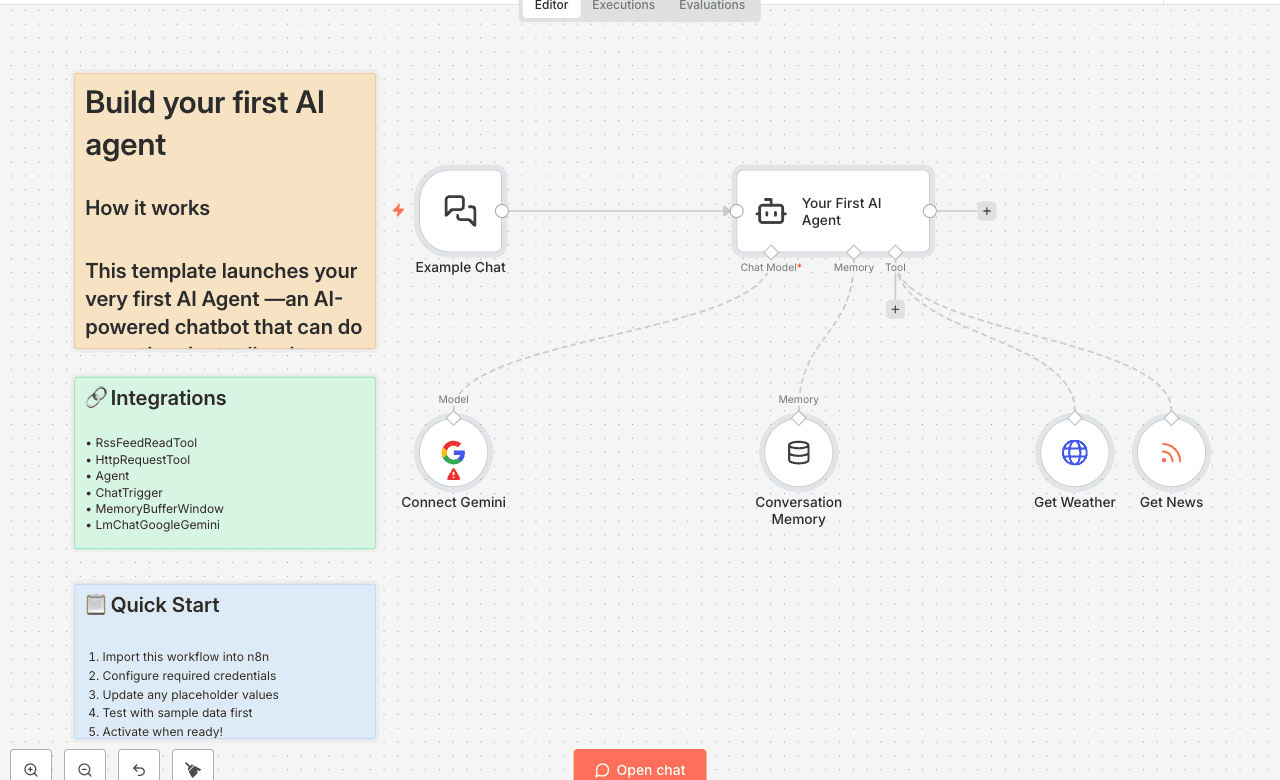
How it works
This template launches your very first AI Agent —an AI-powered chatbot that can do more than just talk— it can take action using tools.
Think of an AI Agent as a smart assistant, and the tools are the apps on its phone. By connecting it to other nodes, you give your agent the ability to interact with real-world data and services, like checking the weather, fetching news, or even sending emails on your behalf.
This workflow is designed to be the perfect starting point: The Chat Interface: A Chat Trigger node provides a simple, clean interface for you to talk to your agent. The Brains: The AI Agent node receives your messages, intelligently decides which tool to use (if any), and formulates a helpful response. Its personality and instructions are fully customizable in the "System Message". The Language Model: It uses Google Gemini to power its reasoning and conversation skills. The Tools: It comes pre-equipped with two tools to demonstrate its capabilities:
Set up steps
Setup time: ~2 minutes
You only need one thing to get started: a free Google AI API key.
Get Your Google AI API Key: Visit Google AI Studio at [aistudio.google.com/app/apikey]. Click "Create API key in new project" and copy the key that appears.
Add Your Credential in n8n: On the workflow canvas, go to the Connect your model (Google Gemini) node. Click the Credential dropdown and select + Create New Credential. Paste your API key into the API Key field and click Save.
Start Chatting! Go to the Example Chat node. Click the "Open Chat" button in its parameter panel. Try asking it one of the example questions, like: "What's the weather in Paris?" or "Get me the latest tech news."*
That's it! You now have a fully functional AI Agent. Try adding more tools (like Gmail or Google Calendar) to make it even more powerful.