Back to Templates
AI & Automation
Auto-generate SEO blog posts with Perplexity, GPT, Leonardo & WordPress

Template Info
CategoryAI & Automation
Documentation
⨠SEO Blog Post Automation with Perplexity, GPT, Leonardo AI & WordPress
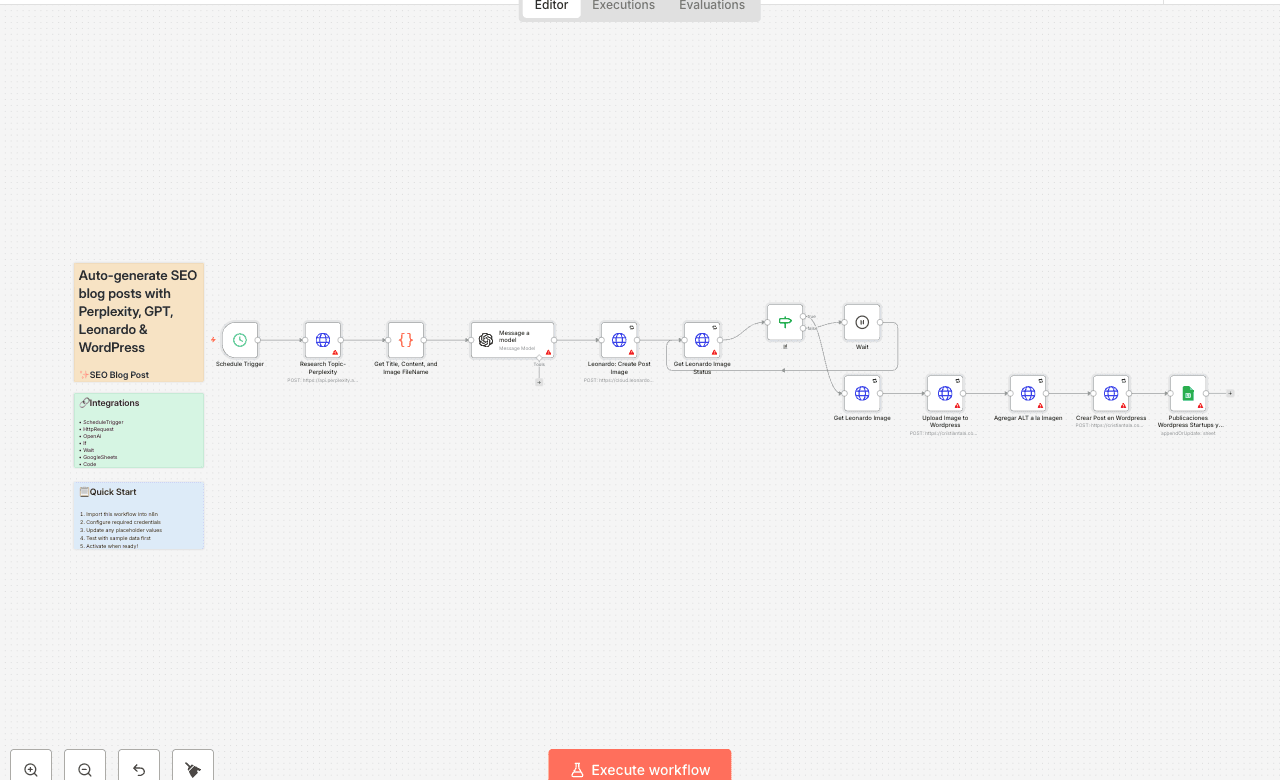
This workflow automates the creation and publishing of weekly SEO-optimized blog posts using AI and publishes them directly to WordPress ā with featured images and tracking in Google Sheets.
š§ Who is this for
This automation is ideal for:
- Startup platforms and tech blogs
- Content creators and marketers
- Solopreneurs who want consistent blog output
- Spanish-speaking audiences focused on startup trends
āļø What it does
- ā° Runs every Monday at 6:00 AM via CRON
- š” Uses Perplexity AI to research trending startup topics
- š Generates a 1000ā1500 word article with GPT in structured HTML
- šØ Creates a cinematic blog image using Leonardo AI
- š¼ļø Uploads the image to WordPress with alt text and SEO-friendly filename
- š° Publishes the post in a pre-defined category
- š Logs the post in Google Sheets for tracking
š How to set it up
- Connect your credentials:
- Perplexity API
- OpenAI (GPT-4.1 Mini or similar)
- Leonardo AI (Bearer token)
- WordPress (Basic Auth)
- Google Sheets (OAuth2)
- Customize your content:
- Adjust the prompt inside the HTTP node to fit your tone or focus
- Change the WordPress category ID
- Update scheduling if you want a different publishing day
- Test the workflow manually to ensure all steps function correctly
š” Pro tips
- Add Slack or email nodes to get notified when a post goes live
- Use multiple categories or RSS feeds for content diversification
- Adjust GPT prompt to support different languages or tones
- Add post-validation rules if needed before publishing
šÆ Why this matters
This workflow gives you a full editorial process on autopilot: research, writing, design, publishing, and tracking ā all powered by AI. No more blank pages or manual posting.
Use it to scale your content strategy, boost your SEO, and stay relevant ā 100% hands-free.