Back to Templates
AI & Automation
🎓 Learn code node (JavaScript) with an interactive hands-on tutorial

Template Info
CategoryAI & Automation
Documentation
How it works
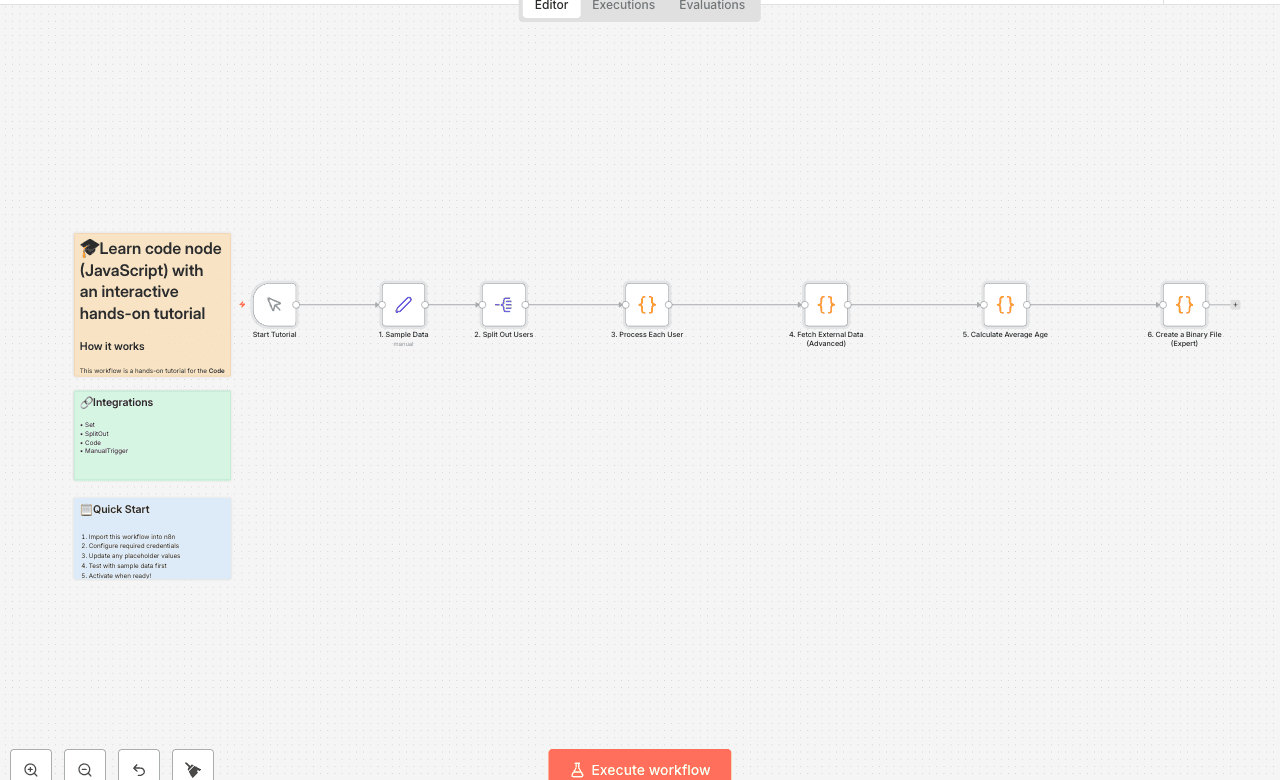
This workflow is a hands-on tutorial for the Code node in n8n, covering both basic and advanced concepts through a simple data processing task.
- Provides Sample Data: The workflow begins with a sample list of users.
- Processes Each Item (Run Once for Each Item): The first Code node iterates through each user to calculate their fullName and age. This demonstrates basic item-by-item data manipulation using $input.item.json.
- Fetches External Data (Advanced): The second Code node showcases a more advanced feature. For each user, it uses the built-in this.helpers.httpRequest function to call an external API (genderize.io) to enrich the data with a predicted gender.
- Processes All Items at Once (Run Once for All Items): The third Code node receives the fully enriched list of users and runs only once. It uses $items() to access the entire list and calculate the averageAge, returning a single summary item.
- Create a Binary File: The final Code node gets the fully enriched list of users once again and creates a binary CSV file to show how to use binary data Buffer in JavaScript.
Set up steps
Setup time: < 1 minute
This workflow is a self-contained tutorial and requires no setup.
- Explore the Nodes: Click on each of the Code nodes to read the code and the comments explaining each step, from basic to advanced.
- Run the Workflow: Click "Execute Workflow" to see it in action.
- Check the Output: Click on each node after the execution to see how the data is transformed at each stage. Notice how the data is progressively enriched.
- Experiment! Try changing the data in the 1. Sample Data node, or modify the code in the Code nodes to see what happens.