Workflow Templates
Ready-to-use n8n workflows built by automation experts. Download, import, and start automating.
Ready-to-use n8n workflows built by automation experts. Download, import, and start automating.
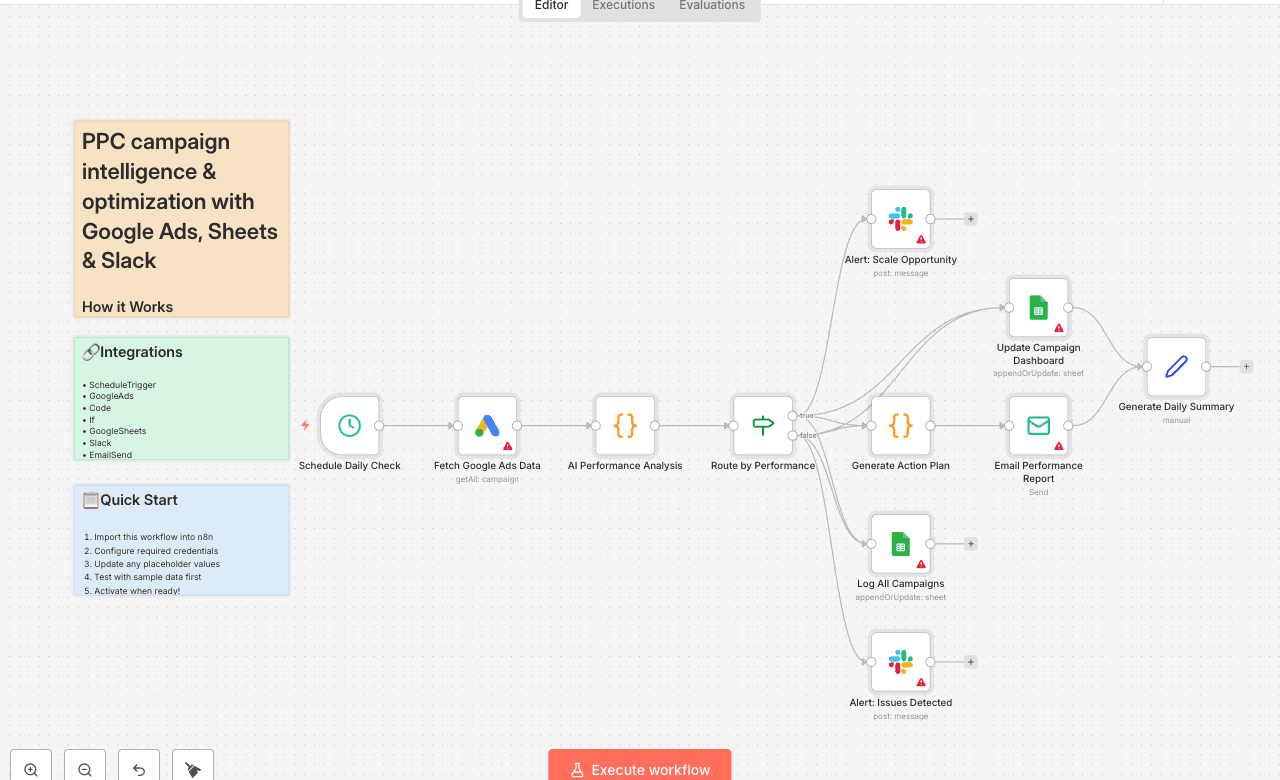
How it Works
This workflow automatically monitors your Google Ads campaigns every day, analyzing performance with AI-powered scoring to identify scaling opportunities and catch issues before they drain your budget. Each morning at 9 AM, it fetches all active campaign data including clicks, impressions, conversions, costs, and conversion rates from your Google Ads account.
The AI analysis engine evaluates four critical dimensions: CTR (click-through rate) to measure ad relevance, conversion rate to assess landing page effectiveness, cost per conversion to evaluate profitability, and traffic volume to identify scale-readiness. Each campaign receives a performance score (0-100 points) and is automatically categorized as Excellent (75+), Good (55-74), Fair (35-54), or Underperforming (0-34).
High-performing campaigns trigger instant Slack alerts to your PPC team with detailed scaling recommendations and projected ROI improvements, while underperforming campaigns generate urgent alerts with specific optimization actions. Every campaign is logged to your Google Sheets dashboard with daily metrics, and the system generates personalized email reports—action-oriented scaling plans for top performers and troubleshooting guides for campaigns needing attention.
The entire analysis takes minutes, providing your team with daily intelligence reports that would otherwise require hours of manual spreadsheet work and data analysis.
Who is this for?
Setup Steps
Setup time: Approx. 15-25 minutes (credential configuration, dashboard setup, alert customization)
Requirements:
Google Ads account with active campaigns
Google account with a tracking spreadsheet
Slack workspace
SMTP email provider (Gmail, SendGrid, etc.)
Create a Google Sheets dashboard with two tabs: "Daily Performance" and "Campaign Log" with appropriate column headers.
Set up these nodes:
Schedule Daily Check: Pre-configured to run at 9 AM daily (adjust timing if needed).
Fetch Google Ads Data: Connect your Google Ads account and authorize API access.
AI Performance Analysis: Review scoring thresholds (CTR, conversion rate, cost benchmarks).
Route by Performance: Automatically splits campaigns into high-performers vs. issues.
Update Campaign Dashboard: Connect Google Sheets and select your "Daily Performance" tab.
Log All Campaigns: Select your "Campaign Log" tab for historical tracking.
Slack Alerts: Connect workspace and configure separate channels for scaling opportunities and performance issues.
Generate Action Plan: Customize email templates with your brand voice and action items.
Email Performance Report: Configure SMTP and set recipient email addresses.
Credentials must be entered into their respective nodes for successful execution.
Customization Guidance
Once configured, this workflow will continuously monitor your ad spend, identify opportunities worth thousands in additional revenue, and alert you to issues before they waste your budget—transforming manual reporting into automated intelligence.
Built [Connect on LinkedIn]